-
PHP 5.4 and Short Tags
03 July 2015
Read morePHP 5.4 isn't exactly new; in fact the opposite is true! PHP 5.4 is end of life, but as our adoption rates show, as a community, PHP people aren't especially good at upgrading! I'm getting lots of questions now because some of the hosting providers, notably including Acquia's …
-
PHP Version Adoption
04 June 2013
Read morePHP runs over 75% of all websites whose technologies are known (source: w3techs), which makes for a really REALLY long tail of users who once installed wordpress, phpmyadmin, or some other open source project that helped their business needs at the time. What they don't do is upgrade. PHP's current …
-
Zend Webinar on PHP 5.4: 19th February
24 January 2013
Read moreI am pleased to announce that I'll be presenting one of Zend's webinars in February, on Tuesday 19th. The topic is "The PHP 5.4 Features You'll Actually Use", and the session is my opportunity to round up the best of the new features that came in with PHP 5 …
-
PHP 5.4 Timezone Error Message on Ubuntu
16 January 2013
Read moreQuick post because this tripped me up the other day: When you use a vanilla ubuntu 12.10 "Quantal Quetzal" installation, it will come with PHP 5.4, which is excellent news. However the default php.ini doesn't set the timezone, so you will see an error like:
It is …
-
Managing PHP 5.4 Extensions on Ubuntu
29 November 2012
Read moreMy shiny new VPS* runs Ubuntu 12.10 (official subtitle: Quantal Queztal. Local nickname: Quirky Kestrel) and therefore has PHP 5.4 installed. It's very new so every command I type is missing, and today I realised that included a PECL module (pecl_http, of course). So I aptitude install php5-pear and then get tangled in dev packages (clue: look which libcurl you have already installed to figure out which of a long list of -dev packages to choose), managing finally to emerge with a pecl install http that completes successfully with the words:configuration option "php_ini" is not set to php.ini locationYou should add "extension=http.so" to php.iniI've been using Ubuntu for some time however, and we don't put settings straight into php.ini, there's a directory called /etc/php5/conf.d/ where all the various module configurations live, or you can enable things just for when PHP is called by apache or from the CLI. However today I hopped into /etc/php5/ and saw this:.├── apache2├── cli├── conf.d└── mods-availableHmmm ... mods-available ?
-
Speaking at CakeFest 2012
26 July 2012
Read moreI'm delighted to announce that the nice people over at CakePHP have very kindly invited me to speak at their event in Manchester in September - CakeFest! They brought this event to Manchester last year and I wasn't able to make it, so I'm super-excited to be there this year.
-
PHP 5.4 Benchmarks
18 July 2012
Read moreToday I'm giving my first ever talk at OSCON - about PHP 5.4 (I'll also be giving my second ever talk at OSCON, about RESTful services; it's a busy day!). My talk includes some benchmarks which I thought I'd also share here.
-
PHP's Magic __invoke() Method and the Callable Typehint
10 July 2012
Read morePHP has a variety of magic methods; methods named with two underscores at the start, which get called automatically when a particular event happens. In PHP 5.3, a new magic method was added: __invoke().
-
Proof that PHP 5.4 is Twice as Fast as PHP 5.3
14 June 2012
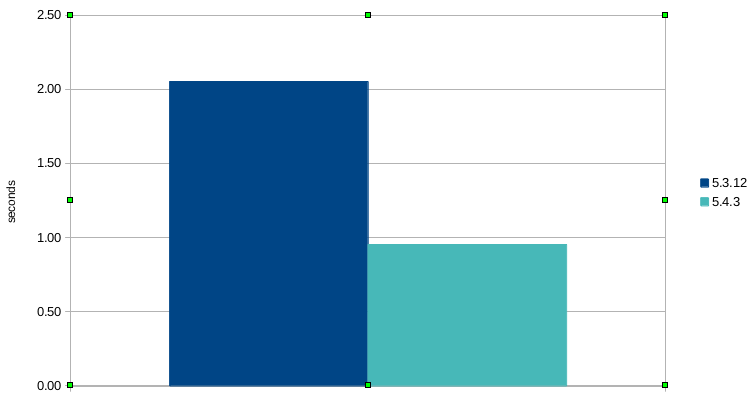
Read moreSo recently I was working on some benchmarks for different versions of PHP, because I heard that PHP 5.4 is "faster" and since I'm a data geek I want to know how much faster! Now, PHP 5.4 is, in general, faster than PHP 5.3 but not twice as fast* unless you pick a use case which has been particularly optimised.
My first attempt at benchmarking the two versions produced this:
-
PHP 5.4 Built In Webserver
30 January 2012
Read moreOne of the big features arriving with PHP 5.4 is the addition of a built-in basic webserver for use in development environments. Quite a few of the other scripting languages have something like this so I'm very pleased to see it in PHP. Using a server like this makes it easy to quickly try out some scripts without needing to configure apache or really do anything much! I had to look up a few things to get started, so I thought I'd write them down for posterity.